Node endpoints
You can run your own node for interacting with the Midnight Network or connect to public endpoints provided by infrastructure service providers.
This guide provides instructions on how to use the public network endpoints for the Midnight blockchain.
Quickstart
Run your first request against the Preview network:
- cURL
- TypeScript
- Python
- Rust
curl -X POST https://rpc.preview.midnight.network/ \
  -H "Content-Type: application/json" \
  -d '{"jsonrpc":"2.0","method":"system_chain","params":[],"id":1}'
const res = await fetch("https://rpc.preview.midnight.network/", {
  method: "POST",
  headers: { "Content-Type": "application/json" },
  body: JSON.stringify({
    jsonrpc: "2.0",
    method: "system_chain",
    params: [],
    id: 1
  })
});

console.log(await res.json());
import requests

response = requests.post(
    "https://rpc.preview.midnight.network/",
    json={
        "jsonrpc": "2.0",
        "method": "system_chain",
        "params": [],
        "id": 1
    }
)

print(response.json())
use reqwest::Client;
use serde_json::json;

#[tokio::main]
async fn main() {
    let client = Client::new();

    let res = client.post("https://rpc.preview.midnight.network/")
        .json(&json!({
            "jsonrpc": "2.0",
            "method": "system_chain",
            "params": [],
            "id": 1
        }))
        .send()
        .await
        .unwrap();

    let body = res.text().await.unwrap();
    println!("{}", body);
}
Public network endpoints
Midnight currently maintains two active test networks for development and testing.
- Preview
- Preprod
The primary development environment maintained by core engineering.
| Service | URL |
|---|---|
| RPC endpoint | https://rpc.preview.midnight.network/ |
| WebSocket | wss://rpc.preview.midnight.network/ |
| Explorer | https://polkadot.js.org/apps/?rpc=wss%3A%2F%2Frpc.preview.midnight.network#/explorer |
Pre-production environment for final testing before Mainnet deployment.
| Service | URL |
|---|---|
| RPC endpoint | https://rpc.preprod.midnight.network/ |
| WebSocket | wss://rpc.preprod.midnight.network/ |
| Explorer | https://polkadot.js.org/apps/?rpc=wss%3A%2F%2Frpc.preprod.midnight.network#/explorer |
Midnight provides public endpoints for development and testing purposes. For production DApps, consider running your own RPC node or using a dedicated infrastructure provider for better reliability and performance.
Common RPC queries
The following examples show how to query the chain information, list available RPC methods, and get the latest block for the Preview network.
Query chain information
Example query to get the chain name for the Preview network:
curl -X POST \
  -H "Content-Type: application/json" \
  -d '{
        "jsonrpc": "2.0",
        "method": "system_chain",
        "params": [],
        "id": 1
      }' \
  https://rpc.preview.midnight.network/
List available RPC methods
Query all available RPC methods and save to a file for the Preview network:
curl -X POST \
  -H "Content-Type: application/json" \
  -d '{
        "jsonrpc": "2.0",
        "method": "rpc_methods",
        "params": [],
        "id": 1
      }' \
  https://rpc.preview.midnight.network/ \
  | jq '.' > rpc_methods.json
Get latest block
Example query to get the latest block for the Preview network:
curl -X POST \
  -H "Content-Type: application/json" \
  -d '{
        "jsonrpc": "2.0",
        "method": "chain_getBlock",
        "params": [],
        "id": 1
      }' \
  https://rpc.preview.midnight.network/
Insomnia API collection
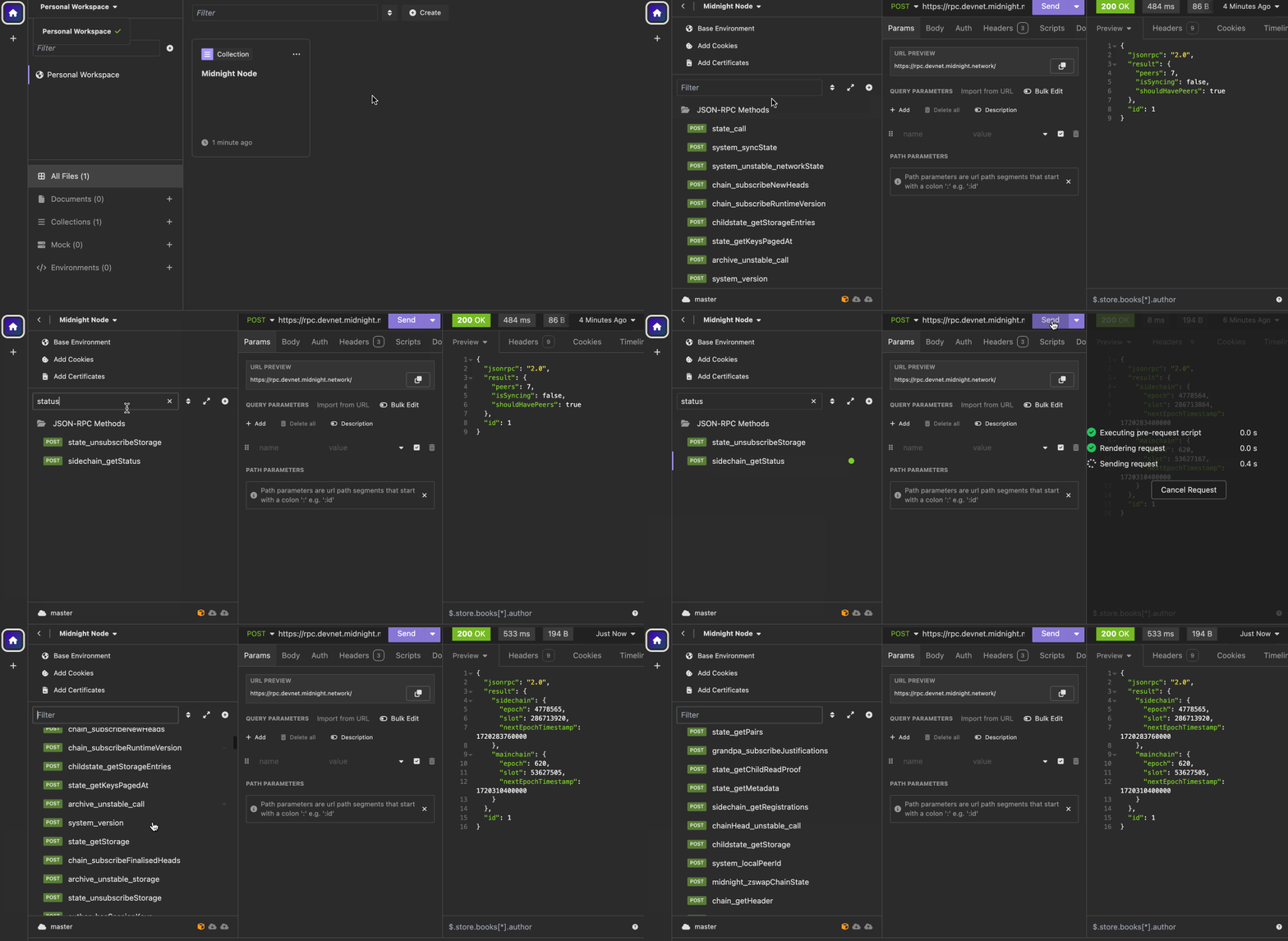
The Insomnia collection provides pre-configured requests for interacting with Midnight RPC endpoints.
Download
Download the collection file: Midnight Node Insomnia collection
Import the collection
Open Insomnia and select Import.
Choose the File tab and select the downloaded file.
Click Scan to import the collection.
Download Insomnia from the official website if you haven't already.
Use the collection
Locate the Midnight Node collection in your workspace.
Update the RPC endpoint if needed. For example, if you are using the Preprod network, update the endpoint to https://rpc.preprod.midnight.network/.
Run requests to explore available methods.
Troubleshoot
These are some of the common issues that you might encounter and how to fix them.
Request fails with 405
Ensure you are using POST, not GET.
Invalid JSON response
Check JSON formatting and the Content-Type header. The request body should be a valid JSON object.
Empty result
Some RPC methods require parameters. To see the full list of available methods and required parameters, see the Node OpenRPC specification.
Next steps
- Run a Midnight Node in validator mode to validate transactions and blocks
- Explore the Node OpenRPC specification for full method documentation